- Introduction
- Learn
- Try It
 Task
Task
Task

 This assignment requires you to submit two items. Read the directions carefully.
Part One:
Use the US Census Bureau website to create a population pyramid for the county in which you live.
- Go to US Census: Population by Age and Gender.
- Click "Geos" symbol.
- Click "County"
- Choose the Alabama from the dropdown list.
- Choose the County you live in. If your county is on not the list, choose a neighboring county or one that has a population similar to the county in which you live.
- Click on the "X" for Close box.
- You will then see a table with the listed information needed for your assignment.
- Below you will see a screenshot of what the page should look like after steps. You can click the dashes beside the red arrow if you are having trouble seeing the full table.
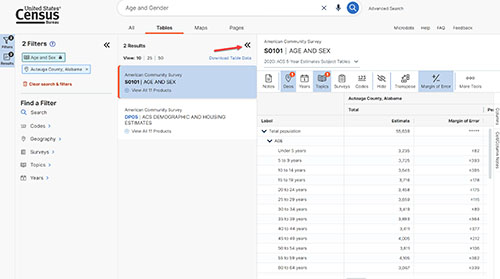
- Use these instructions when creating your spreadsheet.
Part Two:
Continue using the Census Bureau website to complete 2.03 Population Pyramid Lab.
- Use US Census: Educational Attainment, and the same instructions as you used for the population, to find education information.
- Use Income in the Past 12 Months, and Status in the Past 12 Months, with the same instructions to find income information.
Submit your completed assignment.
Complete 2.03 Compare Population Pyramids Discussion. Follow all of the steps carefully in order to receive full credit for this discussion.
- Post your completed population pyramid that you created in the previous assignment.
- After posting your pyramid, view your classmates' pyramids and find at least two that are not the same city as yours.
- Reply to their posts with a brief comparison of how their pyramid compares to yours. Also, based on what you learned from creating your pyramid, explain to them how your city and theirs might compare in terms of education obtained and household income.
- Be sure to go back to your original post and respond to any classmates' who posted on yours. Tell them if they were correct in guessing the education obtained and median household income for your city.
 |